
The workspace
The Work log
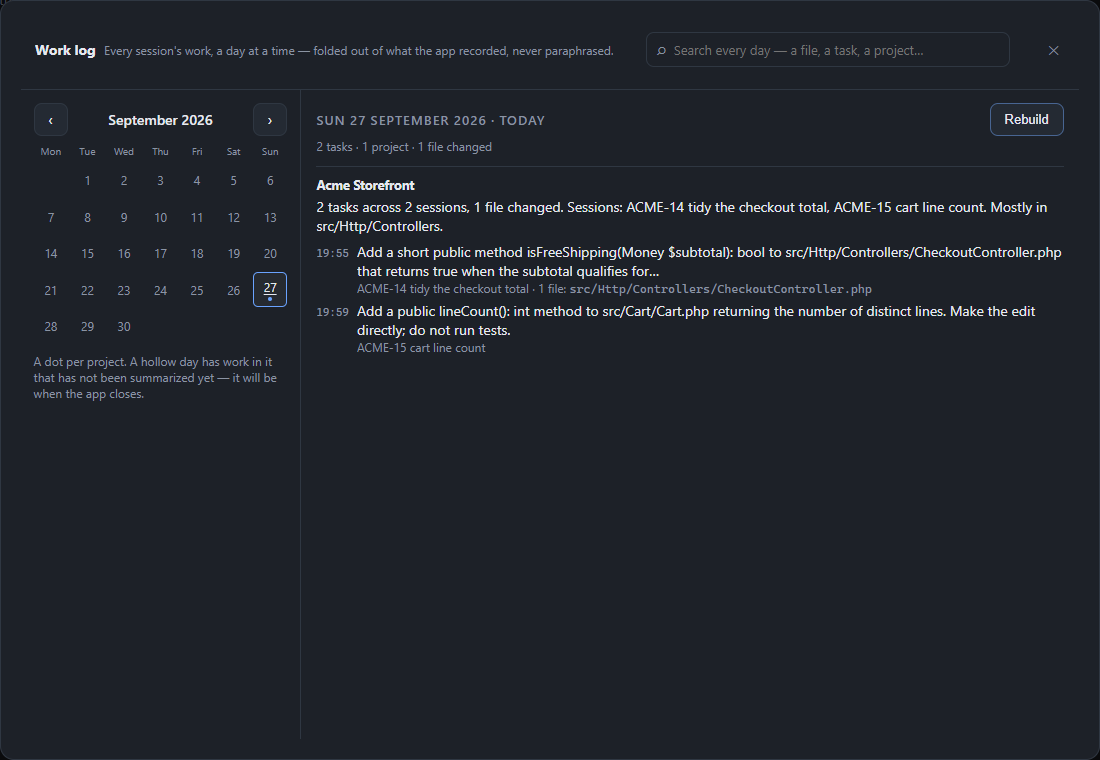
The Work log (🗓 Work log in the top bar) answers "what did I do on Tuesday?" across every project. It is a Pro feature; on Free the button opens a page explaining it.
It opens on a month calendar. Pick a day and you get that day's work grouped by project, then by task. Every line is either something Ropenode measured — how many files a turn changed — or a prompt you typed. Nothing is paraphrased by a model, so the log cannot invent work that did not happen.
When a day is written
- when you close the app — a short "Summarising…" card appears first;
- from the Work log itself;
- at startup, for any earlier day that was never summarised.
Days follow your own clock, not UTC: work at 23:30 on a Tuesday is Tuesday's.
Search
Search looks through every summarised day — the text, the project names and the file paths — so typing a file name finds the day it was touched. A day that was never summarised is not searchable, and an empty result says so.
Scope
The Work log is built from the turn records of Claude Code sessions. A Codex console records no turns, so its work does not appear.
Last updated Oct 11, 2026